This is default featured slide 1 title

Go to Blogger edit html and find these sentences.Now replace these sentences with your own descriptions.

This is default featured slide 2 title

Go to Blogger edit html and find these sentences.Now replace these sentences with your own descriptions.

This is default featured slide 3 title

Go to Blogger edit html and find these sentences.Now replace these sentences with your own descriptions.

This is default featured slide 4 title

Go to Blogger edit html and find these sentences.Now replace these sentences with your own descriptions.

This is default featured slide 5 title

Go to Blogger edit html and find these sentences.Now replace these sentences with your own descriptions.

Showing posts with label Battery. Show all posts

Tuesday, March 26, 2013

Lenovo ThinkPad Edge S430 Fastest Laptops Ever


Lenovo Rolls Out The New Lenovo ThinkPad Edge S430 Fastest Latops Ever And Announced its new Lenovo ThinkPad portfolio of small to medium business SMB big baller laptops really built with serious business technology, gaming, performance and personal lifestyle computing features integrated into one of the fastest laptops i've put my hands on in the last couple of years.
The new line of laptops includes both the kick arse premium high end ThinkPad Edge S Series and the mainstream big baller ThinkPad Edge E Series and the your broke entry level Lenovo S430 B Series.

The ThinkPad Edge S430 laptop comprises of performance technologies and innovations, such as the latest Intel Core processors technology.
 Aesthetically, the new laptop has a Mocha Black look with metal accents and measures less than one-inch in thickness. The 14-inch laptop is equipped with a DVD burner (or a second hard drive for up to 1 TB of storage, which can be combined with solid state drive storage), the choice of Intel integrated or NVIDIA Optimus graphics, Dolby Home Theatre v4, USB 3.0 ports and Intel Thunderbolt technology. 
The ThinkPad Edge S430 also comes with remote management software for energy savings and deploying updates called Lenovo Solution Center.
The smaller 11.6-inch ThinkPad Edge and 13.3-inch laptops optimize their performance with the latest Intel Core processors on the E130 and E330 or AMD Vision Accelerated processors on the E135 and E335 laptops. They feature a graphite grey interior with choices of Midnight Black, Heatwave Red or Cobalt Blue covers with the same progressive design of the ThinkPad Edge S430 laptops.

Lenovo B Series, the new entry-level laptops, provide entry-users with an affordable alternative. Starting at just $349, they are equipped with the latest Intel Core processors (on the B480 and B580) or AMD Fusion APUs (on the B485 and B585 models) along with integrated or discrete graphics. In addition, the new laps can hold up to 1 TB of storage, has USB 3.0 ports, an HDMI out port, and 4-in-1 multicard reader. The B Series laptops also come with Lenovo Solution Center powered by Intel Small Business Advantage.

The ThinkPad Edge E130/135, E330/335 and Lenovo B480/485, B580/585 Series laptops will be available in select markets, whereas the ThinkPad Edge E430/435, E530/535 laptops will be available worldwide beginning in April. The ThinkPad Edge S430 laptop will be available in June in select markets.

Pricing starts at roughly $399 for the ThinkPad Edge laptops, $349 for the Lenovo B Series laptops, and $749 for the ThinkPad S430 laptop.

Covers:

  1. thinkpad edge s430
  2. lenovo s430
  3. lenovo thinkpad edge s430
  4. thinkpad s430
  5. lenovo thinkpad s430
  6. lenovo s430 review
  7. lenovo edge s430
  8. lenovo thinkpad edge s430 review
  9. thinkpad edge s430 review
  10. lenovo thinkpad edge s430 test
  11. thinkpad edge 430
  12. lenovo s430 test
  13. thinkpad s430 review
  14. lenovo s430 release date
  15. thinkpad edge s430 test
  16. lenovo thinkpad edge s430 n3b3ege
  17. lenovo thinkpad edge 430
  18. thinkpad s430 test
  19. lenovo s430 specs
  20. thinkpad edge s430 release date
  21. lenovo thinkpad edge s430 specs
  22. thinkpad edge 430 review
  23. thinkpad edge s430 price
  24. thinkpad edge s430 specs
  25. thinkpad s430 release date
  26. thinkpad s430 specs
  27. lenovo thinkpad edge s430 release date
  28. lenovo s430 lounge
  29. lenovo thinkpad s430 release date
  30. lenovo s430 battery life
  31. thinkpad edge s430 thunderbolt
  32. lenovo s430 price
  33. lenovo s430 battery
  34. thinkpad edge s430 weight
  35. thinkpad edge s430 price in india
  36. thinkpad edge e430 review engadget
  37. lenovo thinkpad edge s430 amazon
  38. lenovo s430 specifications
  39. thinkpad edge s430 battery life
  40. thinkpad edge s430 amazon
  41. lenovo thinkpad edge s430 recenze
  42. lenovo thinkpad edge s430 price
  43. lenovo thinkpad edge s430 battery
  44. thinkpad edge s430 buy
  45. lenovo thinkpad s430 14 hd
  46. thinkpad edge s430 laptop
  47. lenovo edge s430 release date
  48. laptop thinkpad edge s430
  49. thinkpad s430 us
  50. thinkpad s430 manual
  51. thinkpad s430 battery life
  52. thinkpad s430 amazon
  53. thinkpad edge s430 reviews
  54. thinkpad edge s430 review cnet
  55. thinkpad edge s430 north america
  56. thinkpad edge s430 laptop with enhanced graphics and faster processing
  57. thinkpad edge e430 newegg
  58. lenovo thinkpad s430 i7 review
  59. lenovo thinkpad edge s430 reviews
  60. lenovo thinkpad edge s430 heureka
  61. lenovo thinkpad edge e430 review india
  62. lenovo thinkpad edge 14 s430
  63. lenovo s430 usa
  64. lenovo s430 price in india
  65. lenovo s430 north america
  66. buy thinkpad s430
 Have To See What Google Webmaster Tools And Google Analytics Stats Pull In On This Lenovo ThinkPad Edge S430 Fastest Laptops Ever Page In The Next Couple Of Days!

Thursday, November 8, 2012

My HP Pavilion DM1-4010EZ Installing Linux Mint 12 Experience

When we last left off working on our lovely new HP DM1-4010EX Sub Notebook, I had just finished installing and configuring Microsoft Windows 7 Home Premium.

Now with the windows operating system out of the way it is time to move into installing a real computer operating system on it, and for the sake of variety the choice this time will be Linux Mint 12 and Cinnamon 1.1.3.

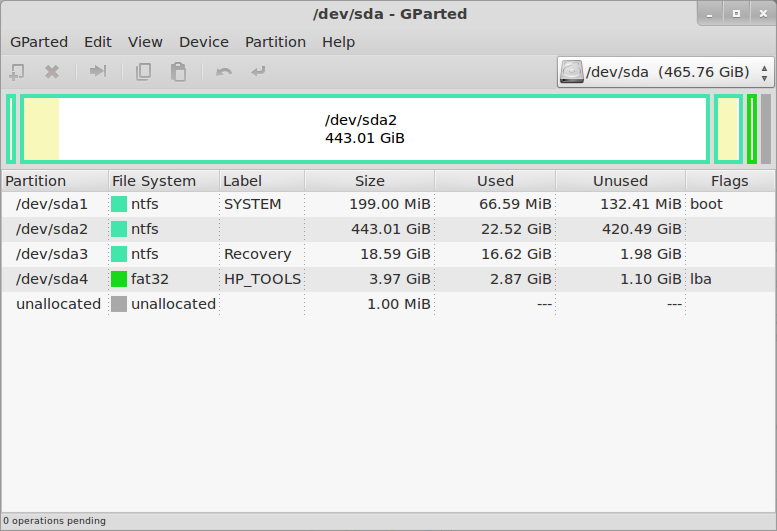
The very first thing to do is prepare the internal hard disk drive. As I said in the previous post, all four of the Primary Partitions are used in the default configuration of this system.

The disk layout looks like this in GParted:
HP Pavilion dm1-4010ez
So there is a tiny bootloader partition, a huge Windows C: partition, a small Windows Recovery partition, and a very small HP Tools partition. One of them has got to go, because the antiquated MBR disk labeling/management system can not have more than four partitions.

I will say this one more time... Make Sure You Have Created A Set Of Recovery DVDs. Once you delete the Recovery partition, you will never have another chance to create them.

The other consequence of deleting the Recovery partition is that you can not do the F11-Recovery procedure, if you ever really need to restore Windows you will have to do it from the DVDs.
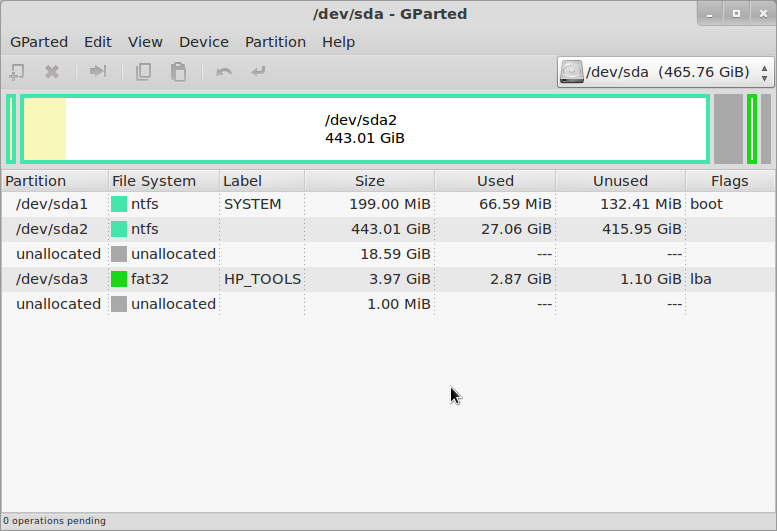
Now we are ready to delete a partition. The obvious candidate is the Recovery partition, both because of its size and content (we know we have it copied on DVD).

The simplest and most direct thing to do is to delete it in GParted, since we already have that running. But in this case it is probably better to go back to Windows and delete it using the HP Recovery Manager, so that it knows that the partition is gone. Either way you do it, once the partition has been deleted the disk will look like this in GParted:
HP Pavilion dm1-4010ez
Although it is quite small, that is actually enough free space to load Linux - especially if you are only "sticking your toes in the water" at this point, and want to see how it goes.

If you want more space you can just shrink the Windows partition (/dev/sda2). The next step is to create an Extended partition in the free space, and then either create two more logical partitions within that for the Linux root and swap, or just leave the extended partition empty and let the Linux installer create the partitions it wants.
It's finally time to actually install Linux Mint 12.

Download the ISO image from the Linux Mint Downloads page. I just about always use the 64-bit images now, but of course you can still use 32-bit if you want or need to, or if you are just extremely conservative. The ISO image can be converted to a bootable USB stick using the "Startup Disk Creator" utility on any running Mint 9/10/11 system, or of course it can be burned to a DVD-R (sorry, too big for CD-R).

Insert the USB stick or connect the USB DVD drive, turn on power and press F9 (the boot device selection key for HP systems). When booting from USB stick, it still stops with an error about the vesamenu not being a COM32R image, and then says "boot: ". Sigh.

I wish this didn't happen, because it confuses an awful lot of inexperienced users. All you have to do is type "live" and press return, but figuring that out can be daunting. I haven't tried burning a DVD for Mint in a long time, does this still happen when booting that way as well?
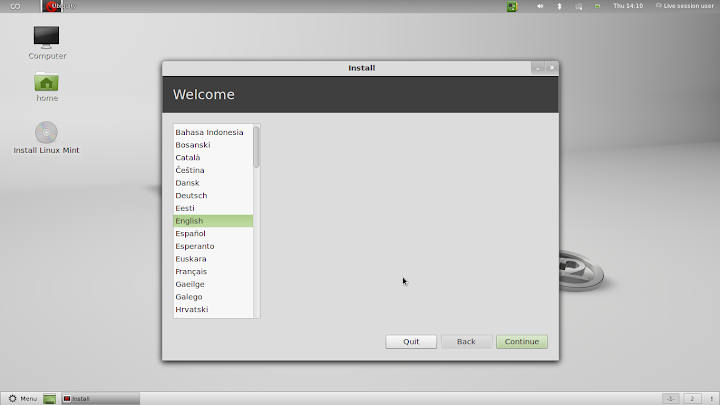
The Mint Live system then comes up, and you will be presented with a normal Mint 12 desktop. One of the icons on that desktop is "Install Linux Mint", which gets you to the Mint installer (duh). The first installer screen asks for the language, which will be used for this installation dialog and as the default for the installed system.
HP Pavilion dm1-4010ez
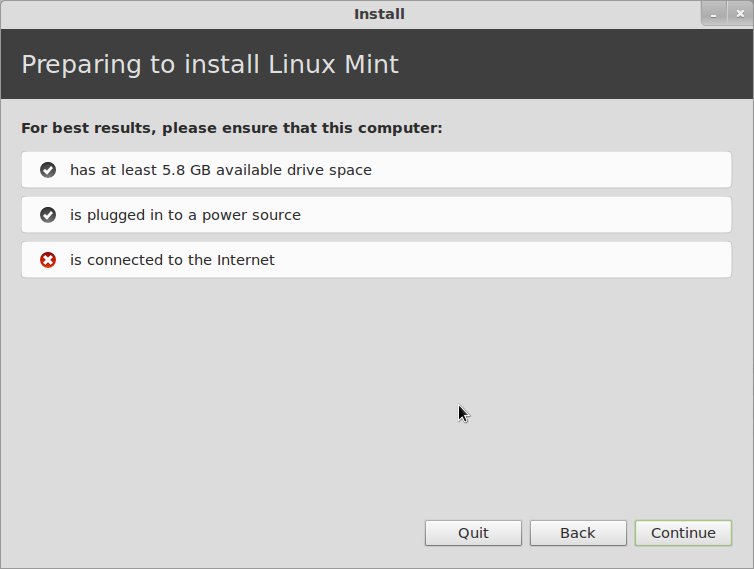
The next screen informs you of the status of disk space, power and Internet connection. You can do the installation just fine without an internet connection, but you really should have power connected, or at least be sure that the battery is full when you start. It's not much fun to have the system die halfway through the installation.
HP Pavilion dm1-4010ez
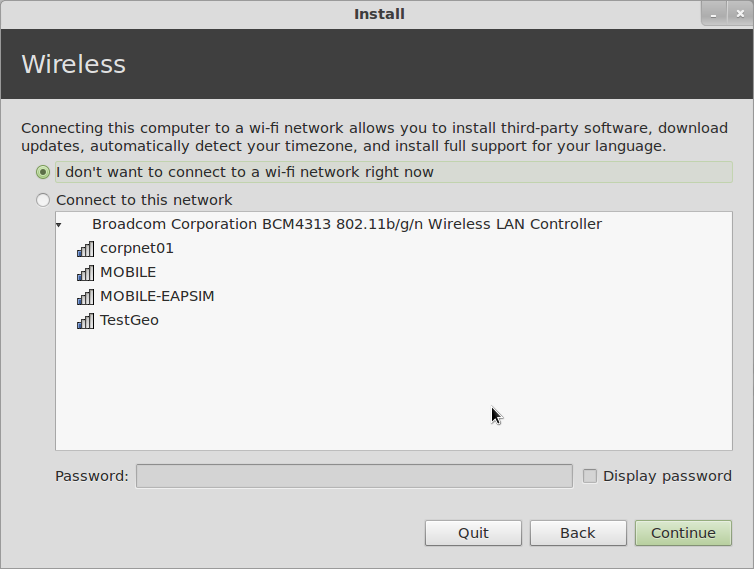
Next you get a chance to connect to a wireless network. This is useful if you want to install updates or additional packages during installation, but as I said it is not absolutely necessary, and I seldom bother with it.
HP Pavilion dm1-4010ez
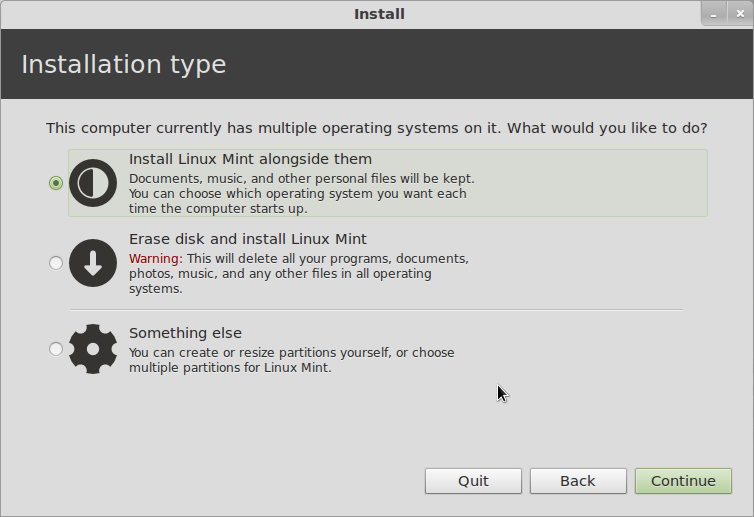
Now comes "Installation Type", which is where you define the disk allocation. If you just created an Extended Partition and left it empty, you can leave this on "Install Linux Mint Alongside Them" and it will do what is necessary. If you like to control things, you can choose "Something Else", which is what I typically do. If you want to ditch Windows and have only Linux installed, choose "Erase disk...".
HP Pavilion dm1-4010ez
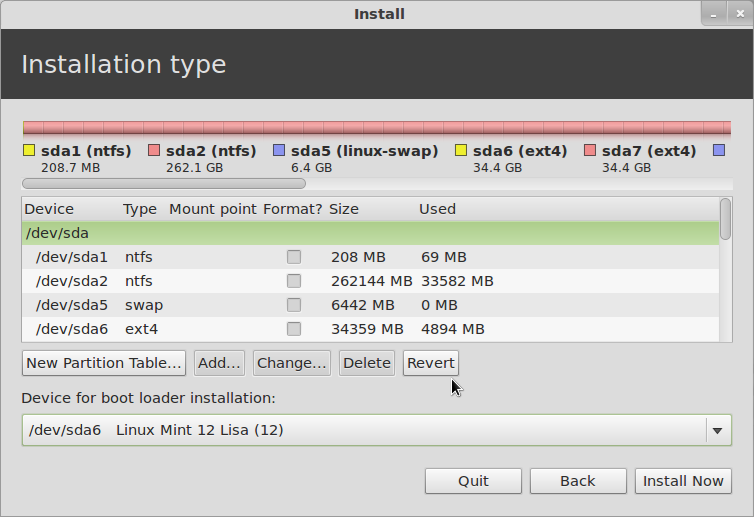
Next you can decide if you want to use the Windows bootloader or Linux GRUB. At the bottom of the window, if you leave the Device for bootloader installation on its default (which is the MBR of the hard drive), you will get Linux GRUB for a bootloader, with Windows listed as a boot option. If you change this to put the bootloader in the root partition of the installed system, you will still have the Windows bootloader, and you will have to follow the instructions I posted a while back to configure that to multi-boot Linux as well.
HP Pavilion dm1-4010ez
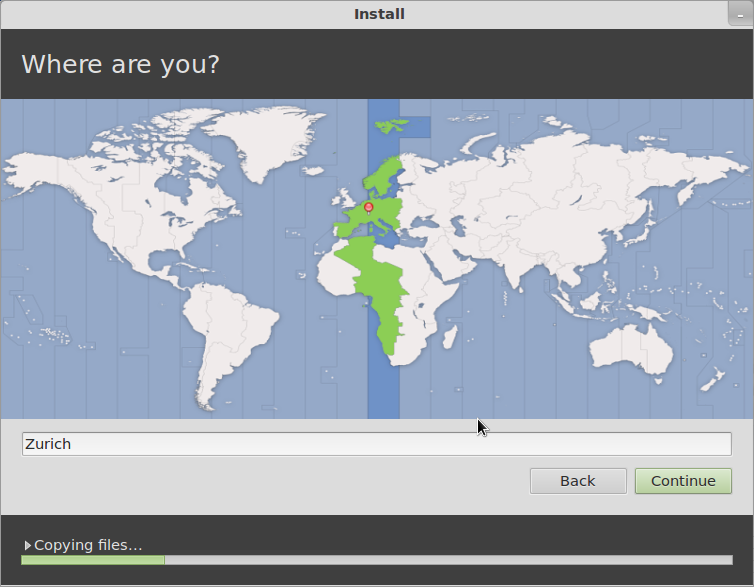
At this point the installer will actually split off and start doing the installation in the background while it continues to ask you a few more questions about the configuration. First is your time zone:
HP Pavilion dm1-4010ez
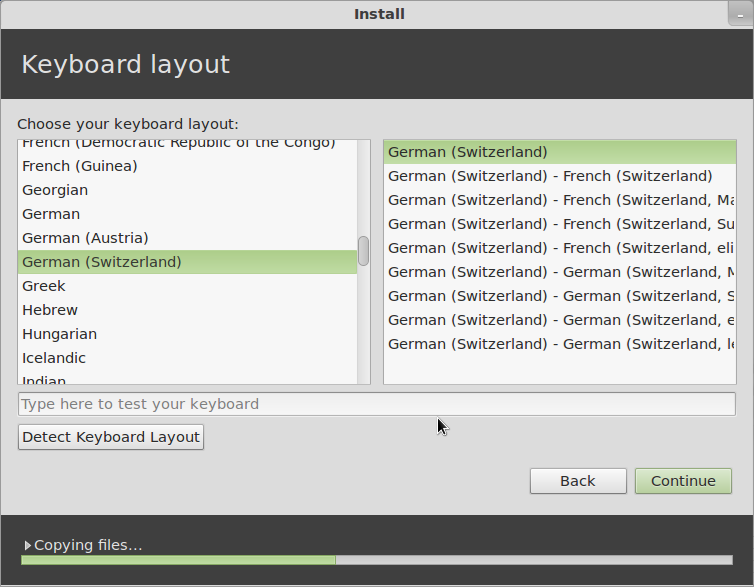
Then comes the keyboard layout...
HP Pavilion dm1-4010ez
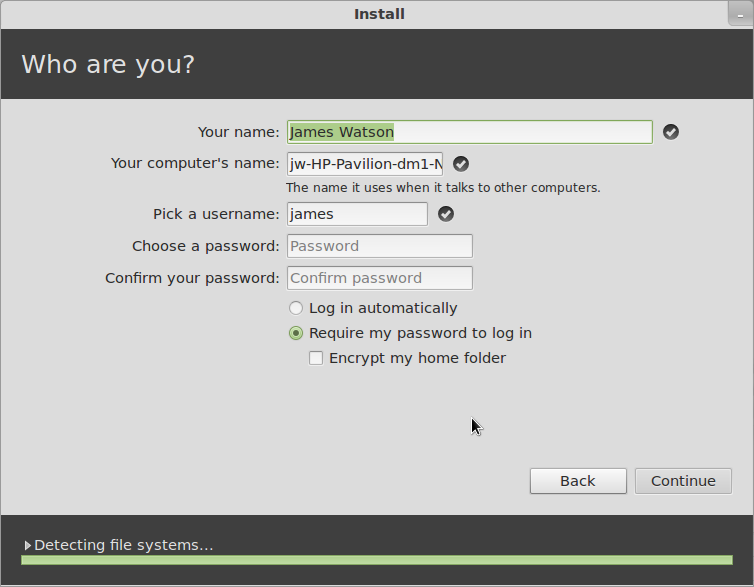
Then comes a series of screens for the the user information.
HP Pavilion dm1-4010ez
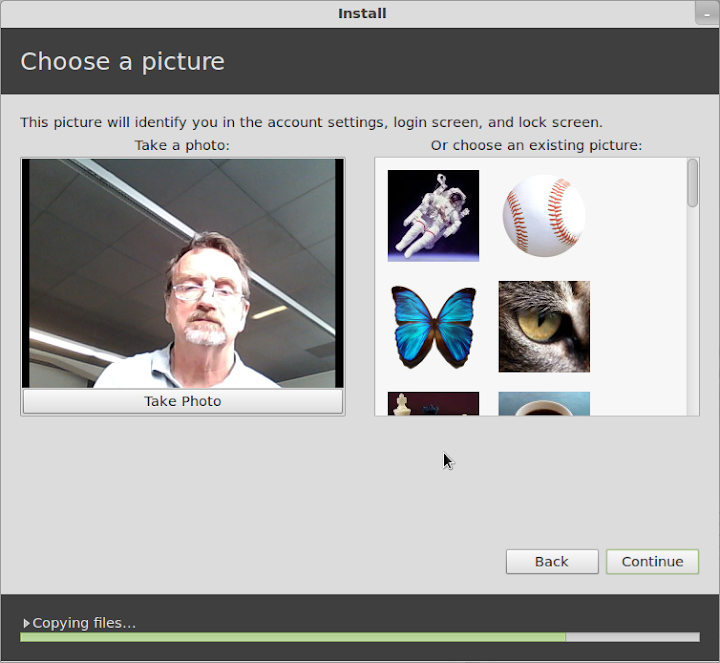
You get to choose a picture for your account - if there is anyone here who really feels that whatever random picture might be taken by the webcam while you are installing is something you might like to have on your account permanently... well, congratulations, you are doing better than I am...
HP Pavilion dm1-4010ez
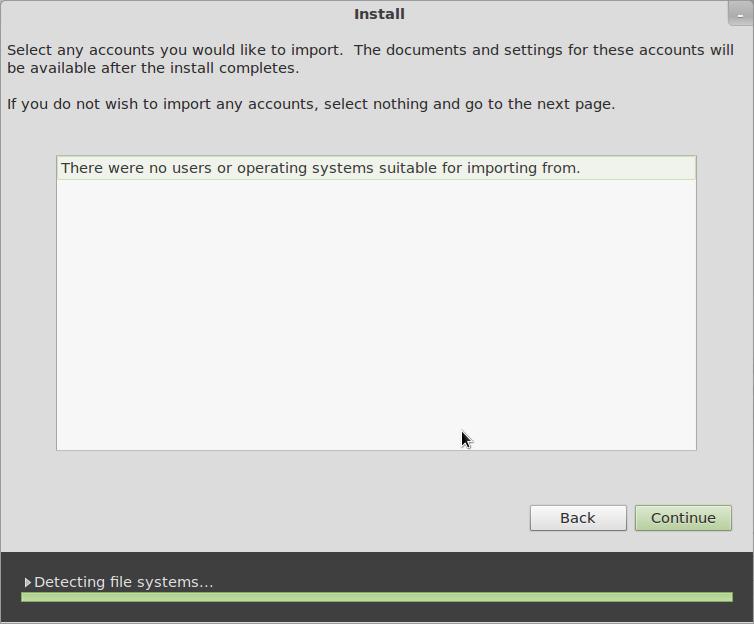
If there is anything else already on the disk that the Installer recognizes and might take over user account information from, it comes up in the next screen.
HP Pavilion dm1-4010ez
Once you have gotten this far, you will get some entertaining propaganda screens while the installation finishes. Hooray! When the installation finishes, reboot (and configure the Windows bootloader if you need to), and you'll be up and running Linux Mint 12.
That might seem like quite a long process, but each of those steps only takes a short time, and the entire installation can be done in 30 minutes if you are reading everything very carefully and thinking about the answers, or as little as 15 minutes or less once you are familiar with it and you're doing it on "autopilot".
Now comes the good news - it works! As far as I can tell, with one small exception, everything works very nicely. Screen resolution is correct (1366x768), wired and wireless networking are ok (although the signal strength looks weak, as it did under Windows), the touchpad works just fine (SO much better for my nerves than the ClickPad), the Fn-keys for brightness, audio and WiFi control, Suspend/Resume (and it does each of those in less than 5 seconds), Mobile Broadband with my Huawei USB dongle... the only thing I have noticed which doesn't work is Bluetooth.

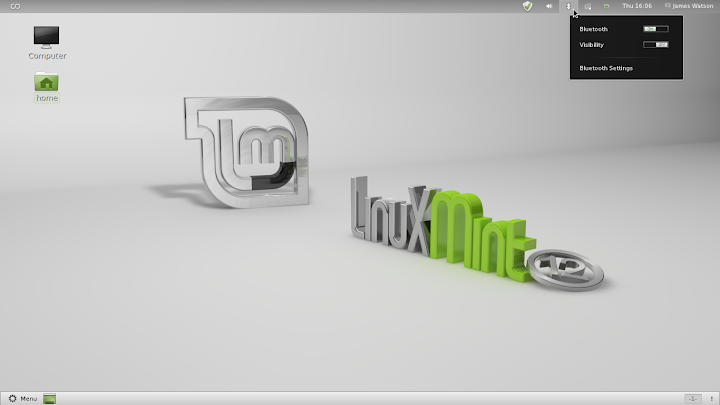
This is a bit of an inconvenience for me, because I sometimes use a bluetooth mouse or printer, but it is certainly not a big deal. By the way, in addition to showing the default Mint 12 desktop, I'll include the simplest way to tell if Bluetooth is working. It seems to me that the Bluetooth icon used to not show up in the panel if Bluetooth wasn't actually available, but now it looks like it is always there - perhaps this is something new with Gnome 3, I haven't really cared enough to look into it yet.

But if Bluetooth is actually available and working, when you click on the Bluetooth icon you will get options for "Send files to device..." and "Set up new device...". If you don't see those, as in the screen below, then Bluetooth is not available, so don't waste a lot of time tearing your hair out trying to figure out how to add a Bluetooth device, as I did, when Bluetooth isn't working at all.

I expect this problem to be taken care of by an update in the near future.
HP Pavilion dm1-4010ez
So, there you have it. I hope all of the detail was worthwhile - I'm certainly not going to be doing this on a regular basis, but I really wanted to show that installing Linux, whether it be openSuSE, Mint, or any of the other popular distributions, was not black magic, and really wasn't even all that difficult or dangerous.

What we have ended up with here is a very nice sub-notebook, it looks good, feels good, works well, and when we turn it on we can choose whether to run Linux Mint 12 (loud cheers in the background) or Windows 7 Home Premium (boos and hisses, and I am ducking lemons and rotten tomatoes being thrown from the cheap seats).
Next on the agenda: add the Cinnamon desktop, and compare it to Gnome and MGSE.

Tuesday, November 6, 2012

j5 Create's Clever Ultrabook KM Dock - PC Magazine

What looks like a flute and works like a Swiss Army knife? j5 Create's JUD500 Ultra Station 3.0 ($129.99), a USB 3.0 peripheral that serves as a plenty-of-ports desktop docking station for an ultrabook or other laptop and also lets that laptop control and transfer files to and from a desktop or other PC.

Plugging into a notebook's USB 3.0 port and an AC outlet, the silver cylinder provides one USB 2.0 port and two USB 3.0 ports, one with smartphone battery charging capability, along with 3.5mm speaker and microphone ports and a 10/100BaseT Ethernet jack. You can also connect a VGA or HDMI external monitor (though not both at once), with resolution up to 1,920 by 1,200.

CES 2012That's pretty standard docking-station fare, but the Ultra Station also features a mini USB port for connection to another computer—either Windows or Mac—using j5 Create's Wormhole technology as seen in the JUC100 Wormhole KM Switch.

The link lets you use one computer's keyboard and mouse or touchpad to control both, changing focus simply by moving the mouse cursor from the edge of one screen onto the other, and drag and drop files between the PCs. The clipboard works to cut, copy, and paste text between systems, too.

The Ultra Station 3.0 looks like a smart solution for someone who carries an ultrabook or other portable but returns to an office desk, particularly if that desk has a desktop PC on it.

Motorola Droid Razr Maxx 4G LTE 32GB Android Phone Unlocked Specs Black Review


  1. motorola droid razr maxx 4g
  2. motorola droid razr maxx 4g android phone
  3. motorola droid razr maxx 4g unlocked
  4. motorola droid razr maxx 4g specs
  5. motorola droid razr maxx 4g lte
  6. motorola droid razr maxx 4g review
  7. motorola droid razr maxx 4g android
  8. motorola droid razr maxx 4g android phone review
  9. motorola droid razr maxx 4g android phone black 32gb
  10. motorola droid razr maxx 4g android phone black 32gb review
With a retail price much lower than those higher-priced recent Android phones which offer inferior battery life and data storage, the Motorola Droid Razr MAXX Android smartphone is arguably one of the best bargains on the entire Verizon Wireless 4G LTE network. No current 4G smartphone delivers more out-of-the-box, user accessible data storage space than the Droid Razr MAXX. And no one comes close to the 21.5 hours of talk time or 15 hours of video playback offered from a single charge of the handset’s battery.

The Motorola Droid Razr Maxx is on sale now starting at $99.99.

With a sub-$100 price tag on contract currently, the handset also benefits from optional Motorola accessories which transform the Android smartphone into a 10.1 inch laptop, desktop PC or multimedia center, and hands-free, in-car GPS device. The Droid Razr MAXX 4G also delivers interior hardware which is protected by a splash resistant layer of nano coating, a display protected by a scratch and chip resistant layer of Corning Gorilla Glass, and a rugged Kevlar and aluminum coated body.

With 32 GB of user accessible data storage available out-of-the-box, in the form of a 16 GB microSD card and an additional 16 GB built into the handset, the Motorola Droid Razr MAXX 4G owner has plenty of room for data and applications. The handset also offer simultaneous voice and data access on Verizon’s 4G LTE system in the United States, which was deemed the fastest and most reliable 4G network among all four US major wireless carriers by independent reviewer RootMetrics.

The handset debuted on January 26 of this year, delivering speeds up to 10 times faster than the Verizon Wireless 3G system. Borrowing the skinny motif of its slimmer twin, the Motorola Droid Razr 4G, the handset measures only 0.35 inches (8.99 mm) in thickness. The Super AMOLED Advanced screen runs 4.30 inches and delivers above average pixel density, at 256 pixels per inch. That results in an overall display resolution of 540 x 960 pixels, and standard capacitive, multitouch gestures are used to navigate the handset.

In the hardware package on board, the extreme battery life comes from a 3,300 mA cell, and a Texas Instruments OMAP 4430 microchip package is used to handle your requests and operations. That chip set is centered around a dual core 1.2 GHz Cortex A9 processor, and a separate PowerVR SGX540 GPU handles all graphics processing. 1.0 GB of RAM system memory is on board, and the rear facing 8.0 megapixel camcorder provides video capture at 1,080P HD resolution.

Friday, September 14, 2012

Will Tesla's SuperCharger network resemble aliens landing at a rest stop? - Torque News


Torque News

Will Tesla's SuperCharger network resemble aliens landing at a rest stop?
Torque News
Then during the Q&A session he talked about fast swapping battery packs on the Tesla Model S and Model X, as well as tantalizing hints about the Tesla Supercharger network. While he did not say many specifics, it was tantalizing and the Tesla ...

and more »

Intel Haswell Chip: Ultrabook Battery Life Doubles - Infopackets


IBNLive.com

Intel Haswell Chip: Ultrabook Battery Life Doubles
Infopackets
Although their popularity is growing all the time, lightweight and portable 'ultrabook' PCs will soon get another boost from a number of emerging technologies, including next-generation batteries that could double the amount of time an ultrabook can ...
Intel Hopes to Double Ultrabook Battery Life With Haswell ChipPCWorld
IDF 2012: Ultrabook hybrids come out to playPC World Magazine
IDF 2012: Intel sticks with Ultrabook goals, targets low-power Haswell at ...ZDNet
CRN
all 386 news articles »

Laptop Power UK Introduces cost effective Samsung NP-X60 Laptop Batteries - Broadcast Newsroom


Laptop Power UK Introduces cost effective Samsung NP-X60 Laptop Batteries
Broadcast Newsroom
Laptop Power UK, the UK's leading online provider of compatible laptop spares and parts, introduces cost effective Samsung NP-X60 laptop Batteries compatible Samsung NP-X60 laptop. This laptop battery contains Samsung battery cells, which will be of ...

and more »

Thursday, September 13, 2012

Samsung Series 5 NP530U3C-A02US 13.3-inch Laptop PC - About - News & Issues


Hindustan Times

Samsung Series 5 NP530U3C-A02US 13.3-inch Laptop PC
About - News & Issues
Sep 13 2012 - Samsung's Series 5 ultrabook is sort of a mid-range offering from the company that does a decent job but just doesn't have enough to make it stand out from the crowded 13-inch ultrabook market. The keyboard and trackpad are the standout ...
IDF 2012: Ultrabook hybrids come out to playPC World Magazine
The Ultrabook Era: Intel's Pledge To Make PCs Cool AgainCRN
Intel Hopes to Double Ultrabook Battery Life With Haswell ChipPCWorld
ZDNet -Hindustan Times
all 367 news articles »

Wednesday, September 12, 2012

Inside Intel's Haswell CPU: Better performance, all-day battery - PCWorld


HEXUS

Inside Intel's Haswell CPU: Better performance, all-day battery
PCWorld
Balancing these contradictory requirements lies at the heart of Intel's new CPU architecture, code-named Haswell, which is expected to appear in shipping tablets, Ultrabooks, and other computers in 2013. At the 2012 Intel Developer Forum earlier this ...
IDF 2012: Intel's fourth generation Core CPU runs as fast as third gen on half ...Good Gear Guide
Intel hopes Haswell CPU architecture can reignite Ultrabook interestHEXUS
IDF: Intel's Haswell CPU to Fuel Future of Mobile Computing InnovationLegit Reviews

all 367 news articles »

Apple Juices Up iPhone 5 With Better Display, 4G Support - CRN


Apple Juices Up iPhone 5 With Better Display, 4G Support
CRN
Apple on Wednesday unveiled the iPhone 5, which features a bigger screen, 4G wireless support, longer battery life and a new, more powerful processor that opens the door wider for content creators. The iPhone 5 comes with a 4-inch display, compared to ...

iPhone 5 Has 4G Support, Larger Screen But No NFC - TechWeekEurope UK


TechWeekEurope UK

iPhone 5 Has 4G Support, Larger Screen But No NFC
TechWeekEurope UK
As predicted, the iPhone 5 features support for 4G networks, including the one announced by EE yesterday in the UK. The smartphone is powered by a new Apple A6 chip that makes it twice as fast as the iPhone 4S. Battery life is roughly the same, lasting ...

and more »

iPhone 5 Comes With New A6 Chip, Ups CPU Power By 2X - WebProNews


Apple Insider

iPhone 5 Comes With New A6 Chip, Ups CPU Power By 2X
WebProNews
In addition to a better camera, better battery life, better Wi-Fi and LTE connectivity, the device comes with a new A6 processor, which Apple says increases the CPU power by 2X. The graphics are also twice as fast, Apple says (compared to the A5 ...
iPhone 5 officially announced with 4-inch display, A6 CPU and LTE for $199 on ...about-electronics.eu
Purported iPhone 5 logic board shows LTE modem, A6 CPUApple Insider
Apple iPhone 5 Debuts: Specs Include 4-Inch Display, New CPU, LTE And More!The Inquisitr
Engadget -Gotta Be Mobile
all 9,344 news articles »

Android Battery Tips - WOAI (blog)


Android Battery Tips
WOAI (blog)
SAN ANTONIO – When I first fired up my Evo I was loving almost everything about it – except the battery life. It needs to be improved – and this on Google (android operating system) and on HTC (maker of the phone). Until they improve things (and they ...

New Apple iPhone 5 to offer 4G LTE - so what is it? - NewsNet5.com


NewsNet5.com

New Apple iPhone 5 to offer 4G LTE - so what is it?
NewsNet5.com
Many users we spoke with were skeptical about the speed of LTE because they haven't seen much difference between 3G and 4G other than their battery dying more quickly. However, Bues said 3G to 4G was an evolutionary change, and 4G LTE is ...

Tuesday, September 11, 2012

Intel hopes to double ultrabook battery life with Haswell chip - Computerworld


Intel hopes to double ultrabook battery life with Haswell chip
Computerworld
The new Haswell chips will also deliver much faster graphics and applications performance when they appear in ultrabook designs starting next year, said Dadi Perlmutter, executive vice president and general manager of Intel Architecture Group, during a ...

Saturday, September 8, 2012

iPhone 5 Release Date Rumors: 4G LTE Feature Will Result in 'Poor Battery Life ... - Enstarz


Enstarz

iPhone 5 Release Date Rumors: 4G LTE Feature Will Result in 'Poor Battery Life ...
Enstarz
Many rumors by tech experts suggest that the iPhone 5 will feature 4G LTE capability which the iPhone 4S does not have. While 4G LTE connectivity is favored for the Apple smartphone, experts wonder if this new feature will result in poor battery life ...

Wednesday, September 5, 2012

Nokia Lumia 920 official: Dual-core 1.5GHz Snapdragon S4 CPU, 8MP ... - Engadget


IntoMobile

Nokia Lumia 920 official: Dual-core 1.5GHz Snapdragon S4 CPU, 8MP ...
Engadget
As one of the first Windows Phone 8 devices to be officially announced, this device augments Espoo's line with a larger, curved 4.5-inch PureMotion HD+ display, dual-core 1.5GHz Snapdragon S4 CPU, 2,000mAh battery, NFC, integrated wireless charging ...
Nokia Lumia 920 to come with 1.5GHz dual-core CPU, 4.5-inch HD screen, 8 MP ...IntoMobile
Nokia Lumia 920: Windows Phone 8, Dual-Core CPU, Wireless Charging, and ...Gotta Be Mobile
Windows Phone 8 Nokia Smartphone With Quad-Core CPU And HD Display ...Tech Source

all 4,089 news articles »

KT Spider Laptop aims to turn your Android handset into a netbook - Know Your Mobile (blog)


Geeky gadgets

KT Spider Laptop aims to turn your Android handset into a netbook
Know Your Mobile (blog)
Korea Telecom (KT) has revealed its plans for the Spider Laptop, an accessory for Android devices that aims to do what Motorola's Laptop Dock has consistently failed to achieve. At first glance the device may look like an ordinary laptop, but in actual ...
KT Spider Laptop Provides Larger Screen And Keyboard For Android ...Geeky gadgets
KT's Spider Laptop acts like an external screen and battery for Android ...IntoMobile

all 3 news articles »

Tuesday, September 4, 2012

HP Folio 13 Ultrabook Laptop Review - TweakTown


TweakTown

HP Folio 13 Ultrabook Laptop Review
TweakTown
This term Ultrabook is a trademark of Intel and is used on computers that meet certain requirements set forth by Intel, which include battery life, quick start from sleep, thickness (or thinness) and several others. Intel is strongly pushing these new ...

Huawei Ascend G600 rocks 1.2GHz dual-core CPU, 4.5-inch qHD screen, solid ... - IntoMobile


Huawei Ascend G600 rocks 1.2GHz dual-core CPU, 4.5-inch qHD screen, solid ...
IntoMobile
Huawei Ascend G600 rocks 1.2GHz dual-core CPU, 4.5-inch qHD screen, solid battery. 0 comments Disqus. Tweet. Categories: Android, Devices, Huawei. By: Dusan Belic, IntoMobile. Monday, September 3rd, 2012 at 11:50 PM. Huawei Ascend G600 rocks ...