This is default featured slide 1 title

Go to Blogger edit html and find these sentences.Now replace these sentences with your own descriptions.

This is default featured slide 2 title

Go to Blogger edit html and find these sentences.Now replace these sentences with your own descriptions.

This is default featured slide 3 title

Go to Blogger edit html and find these sentences.Now replace these sentences with your own descriptions.

This is default featured slide 4 title

Go to Blogger edit html and find these sentences.Now replace these sentences with your own descriptions.

This is default featured slide 5 title

Go to Blogger edit html and find these sentences.Now replace these sentences with your own descriptions.

Showing posts with label Desktop. Show all posts

Monday, November 12, 2012

ASUS CM1740-US-2AG Desktop Repair Guide

What you can get for $500 keeps getting better and better every year and the ASUS CM1740-US-2AG is certainly a nice step up from the model just six months ago. 

This is a good all around system thanks to its quad core AMD processor, 8GB of memory, dedicated graphics and wireless networking. 

It may not be as fast as an Intel based desktop at this price range but it still provides more than enough for the average user. 

The one downside is that the power supply does limit the potential to upgrade the graphics even further for those looking to get a low cost gaming setup.

Pros

Dedicated Graphics Card
8GB Memory
Wireless Networking

Cons

Processor Slower Than Many Dual Core Intel Based Systems
Low Wattage Power Supply Limits Graphics Upgrades
Description

AMD A8-3820 Quad Core Desktop Processor
8GB PC3-128000 DDR3 Memory
1TB 7200rpm SATA Hard Drive
24x DVD+/-RW Dual Layer Burner
AMD Radeon HD 7470 Dedicated Graphics Card With 1GB Memory
5.1 Audio Suuport
Gigabit Ethernet, 802.11b/g/n Wireless
Two USB 3.0, Six USB 2.0, HDMI, DVI, VGA, 6-in-1 Card Reader
Windows 7 Home Premium, Office Starter
Review - ASUS CM1740-US-2AG

Aug 20 2012 - The ASUS CM1740-US-2AG is extremely similar to the CM1720-US-2AF that I reviewed six months ago. It uses the same base components with a few minor upgrades. The processor has been upgraded from the AMD Fusion A6-3620 quad core processor to a slightly faster A8-3820 quad core processor. 

In addition to the processor, the memory was upgraded for 4 to 8GB of DDR3. This is one of the largest capacities you will see in this price range and provides it with the extra boost it needs for dealing with multiasking which is one of the key benefits from the four cores. There are even four memory slots so the RAM can be upgraded further if needed. It should be noted though that in many tasks, the A8 processors still falls behind many of the Intel dual-core processors. Still, for the average user, this should provide it with more than enough performance for the web browsing, media viewing and productivity software.

Storage features for the ASUS CM1740-US-2AG remain unchanged from the 2AF model I looked at six months ago. It features a one terabyte hard drive that provides it with a large amount of space for applications, data and media files. This is typical now for most desktop in this price range. The drive does spin at the full 7200rpm spin rate which does give it a slight speed advantage over those that use the green class drives. If you need addition space, there are two USB 3.0 ports available for use with high speed external hard drives. This was pretty unique six months ago but many more computers now features these ports. A standard dual layer DVD burner is included for playback and recording for CD or DVD media.

The big difference between this system and the last model I reviewed is the graphics system. The AMD A8 processor does feature an integrated Radeon HD 6550D which is a very good system that offers some decent 3D performance and a step up from what the A6 had. What ASUS has done though is include a dedicated AMD Radeon HD 7470 graphics card. This is still a relatively low end graphics card that won't do much beyond basic 3D but it does have the ability to run in a CrossFire setup with the internal graphics to offer even better 3D performance. 

Now, it isn't going to be as good as a midrange card and it does have its quirk in certain programs. This also offers improved acceleration for non-3D applications which is becoming more useful. The graphics card can be swapped out for a higher model but it is still restricted by the relatively low 300 watt power supply.

For those that already have a wireless network setup in their home for use with mobile devices, the CM1740-US-2AG does come with a 802.11b/g/n wireless networking adapter. This makes it easy to setup the system without needing to stretch an ethernet cable between the desktop and your broadband connection.

In terms of the competition for ASUS, the closest desktop system in the $500 price range would be the Acer Aspire AM3450-UR10P. That system offers an eight core processor for additional performance but comes with less memory. While it also features a dedicated graphics card, it falls short of this ASUS system with its newer 7000 series card and the ability to work with the integrated graphics core.

Thursday, November 8, 2012

My HP Pavilion DM1-4010EZ Installing Linux Mint 12 Experience

When we last left off working on our lovely new HP DM1-4010EX Sub Notebook, I had just finished installing and configuring Microsoft Windows 7 Home Premium.

Now with the windows operating system out of the way it is time to move into installing a real computer operating system on it, and for the sake of variety the choice this time will be Linux Mint 12 and Cinnamon 1.1.3.

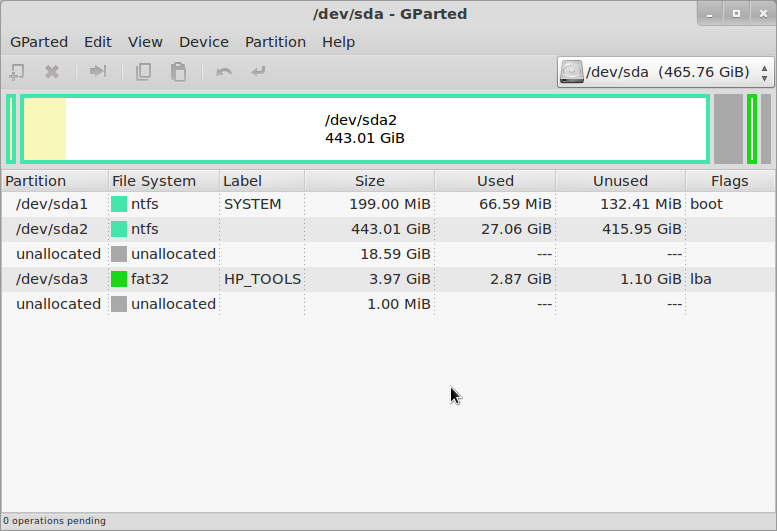
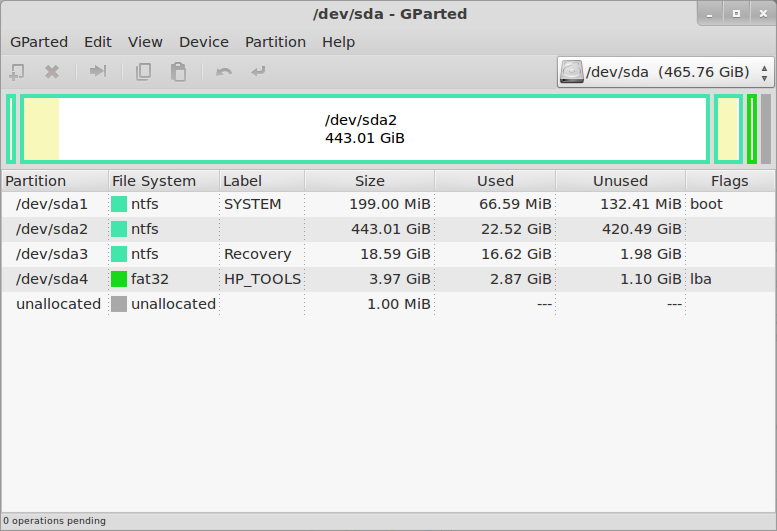
The very first thing to do is prepare the internal hard disk drive. As I said in the previous post, all four of the Primary Partitions are used in the default configuration of this system.

The disk layout looks like this in GParted:
HP Pavilion dm1-4010ez
So there is a tiny bootloader partition, a huge Windows C: partition, a small Windows Recovery partition, and a very small HP Tools partition. One of them has got to go, because the antiquated MBR disk labeling/management system can not have more than four partitions.

I will say this one more time... Make Sure You Have Created A Set Of Recovery DVDs. Once you delete the Recovery partition, you will never have another chance to create them.

The other consequence of deleting the Recovery partition is that you can not do the F11-Recovery procedure, if you ever really need to restore Windows you will have to do it from the DVDs.
Now we are ready to delete a partition. The obvious candidate is the Recovery partition, both because of its size and content (we know we have it copied on DVD).

The simplest and most direct thing to do is to delete it in GParted, since we already have that running. But in this case it is probably better to go back to Windows and delete it using the HP Recovery Manager, so that it knows that the partition is gone. Either way you do it, once the partition has been deleted the disk will look like this in GParted:
HP Pavilion dm1-4010ez
Although it is quite small, that is actually enough free space to load Linux - especially if you are only "sticking your toes in the water" at this point, and want to see how it goes.

If you want more space you can just shrink the Windows partition (/dev/sda2). The next step is to create an Extended partition in the free space, and then either create two more logical partitions within that for the Linux root and swap, or just leave the extended partition empty and let the Linux installer create the partitions it wants.
It's finally time to actually install Linux Mint 12.

Download the ISO image from the Linux Mint Downloads page. I just about always use the 64-bit images now, but of course you can still use 32-bit if you want or need to, or if you are just extremely conservative. The ISO image can be converted to a bootable USB stick using the "Startup Disk Creator" utility on any running Mint 9/10/11 system, or of course it can be burned to a DVD-R (sorry, too big for CD-R).

Insert the USB stick or connect the USB DVD drive, turn on power and press F9 (the boot device selection key for HP systems). When booting from USB stick, it still stops with an error about the vesamenu not being a COM32R image, and then says "boot: ". Sigh.

I wish this didn't happen, because it confuses an awful lot of inexperienced users. All you have to do is type "live" and press return, but figuring that out can be daunting. I haven't tried burning a DVD for Mint in a long time, does this still happen when booting that way as well?
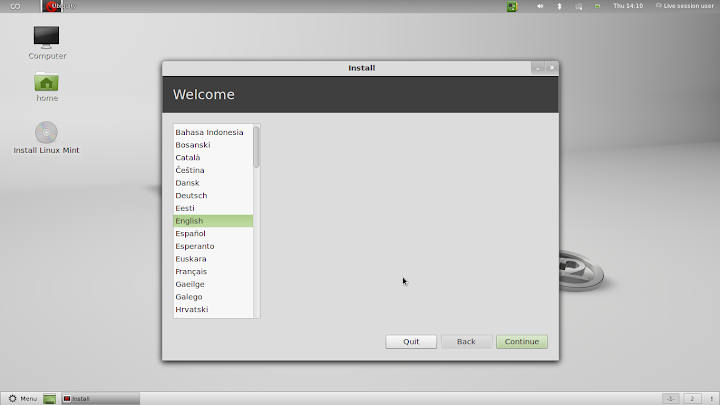
The Mint Live system then comes up, and you will be presented with a normal Mint 12 desktop. One of the icons on that desktop is "Install Linux Mint", which gets you to the Mint installer (duh). The first installer screen asks for the language, which will be used for this installation dialog and as the default for the installed system.
HP Pavilion dm1-4010ez
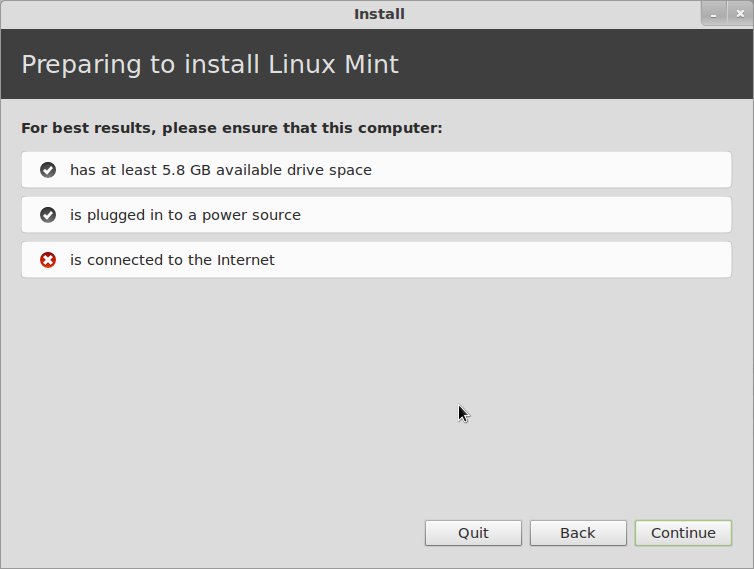
The next screen informs you of the status of disk space, power and Internet connection. You can do the installation just fine without an internet connection, but you really should have power connected, or at least be sure that the battery is full when you start. It's not much fun to have the system die halfway through the installation.
HP Pavilion dm1-4010ez
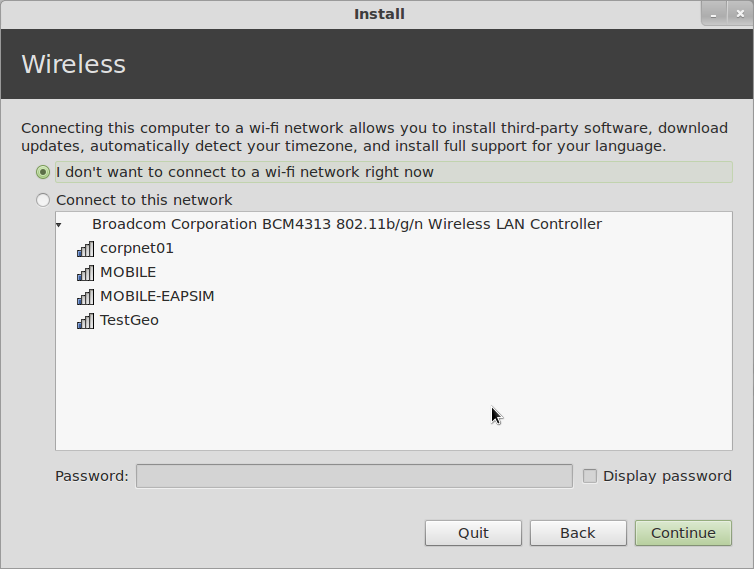
Next you get a chance to connect to a wireless network. This is useful if you want to install updates or additional packages during installation, but as I said it is not absolutely necessary, and I seldom bother with it.
HP Pavilion dm1-4010ez
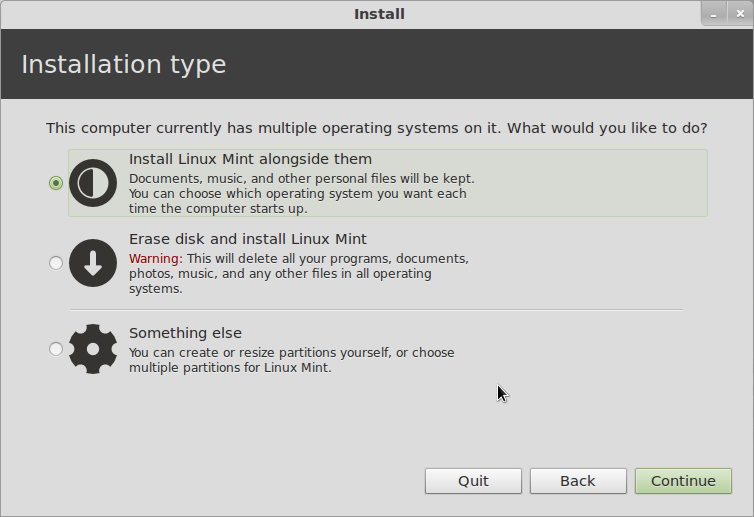
Now comes "Installation Type", which is where you define the disk allocation. If you just created an Extended Partition and left it empty, you can leave this on "Install Linux Mint Alongside Them" and it will do what is necessary. If you like to control things, you can choose "Something Else", which is what I typically do. If you want to ditch Windows and have only Linux installed, choose "Erase disk...".
HP Pavilion dm1-4010ez
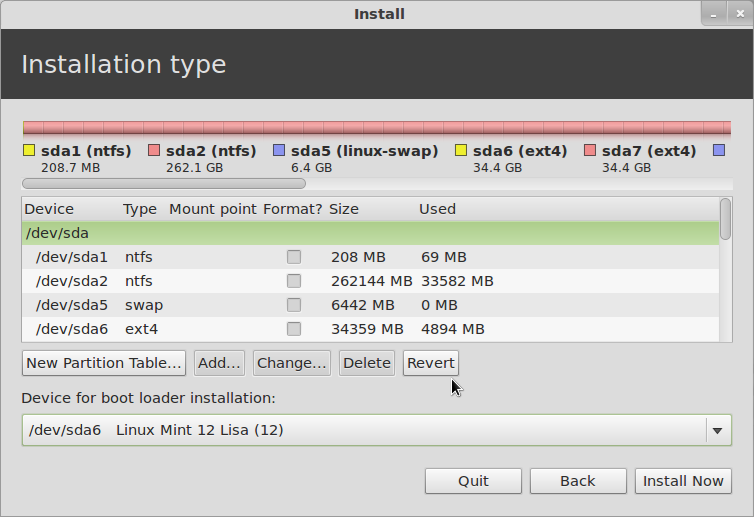
Next you can decide if you want to use the Windows bootloader or Linux GRUB. At the bottom of the window, if you leave the Device for bootloader installation on its default (which is the MBR of the hard drive), you will get Linux GRUB for a bootloader, with Windows listed as a boot option. If you change this to put the bootloader in the root partition of the installed system, you will still have the Windows bootloader, and you will have to follow the instructions I posted a while back to configure that to multi-boot Linux as well.
HP Pavilion dm1-4010ez
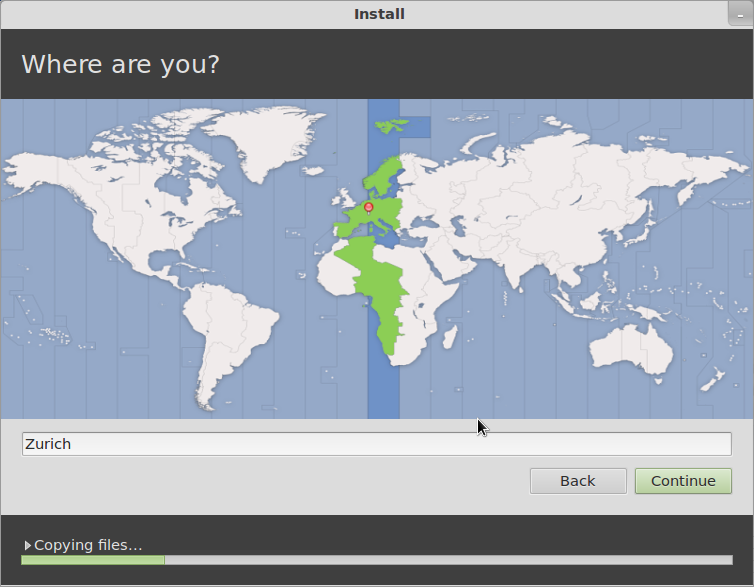
At this point the installer will actually split off and start doing the installation in the background while it continues to ask you a few more questions about the configuration. First is your time zone:
HP Pavilion dm1-4010ez
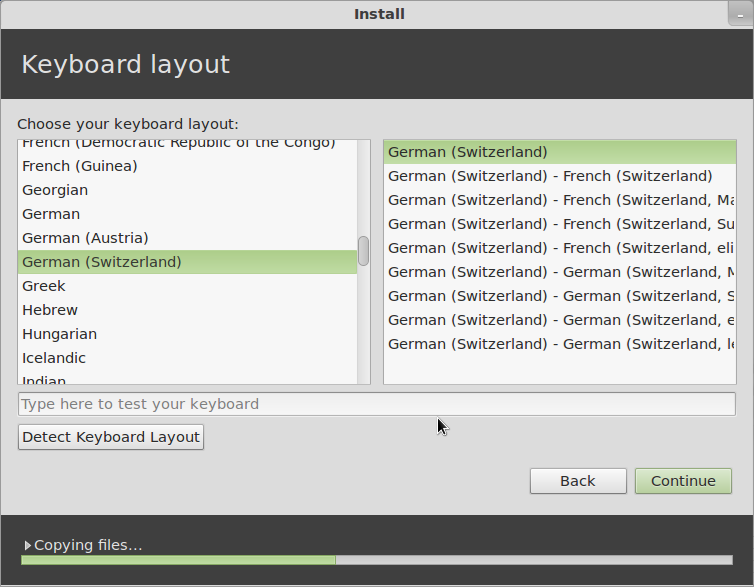
Then comes the keyboard layout...
HP Pavilion dm1-4010ez
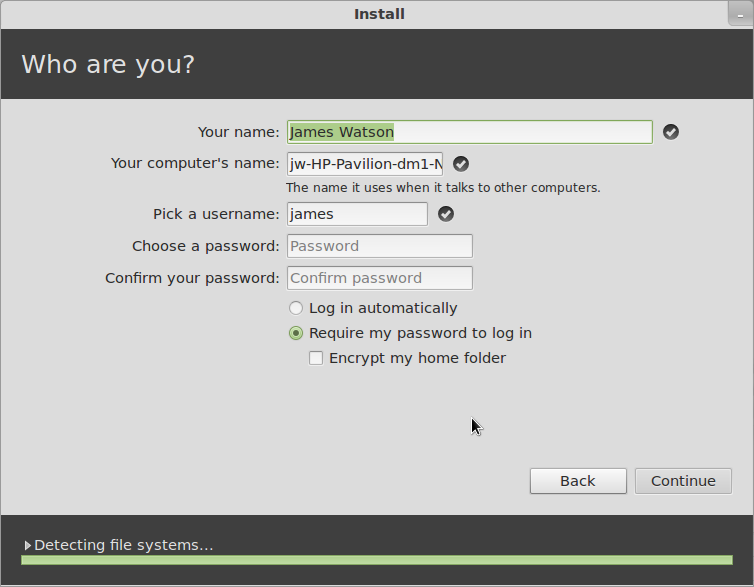
Then comes a series of screens for the the user information.
HP Pavilion dm1-4010ez
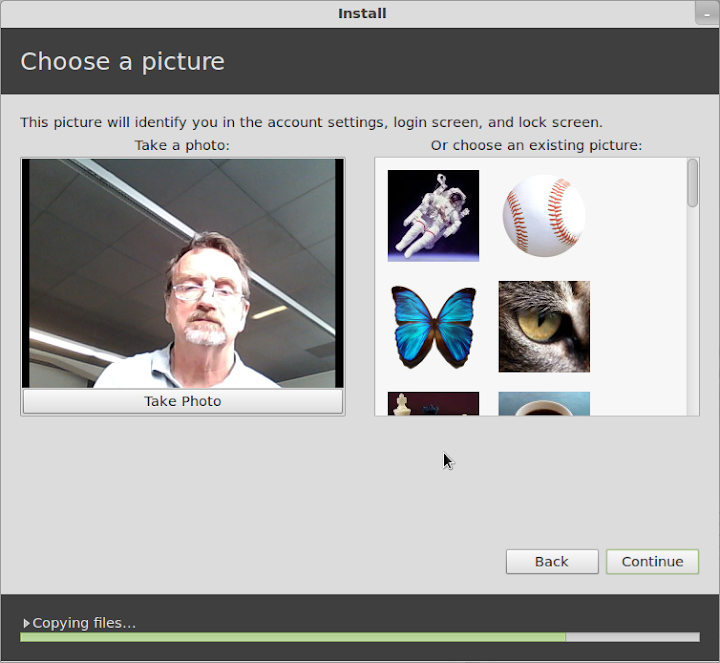
You get to choose a picture for your account - if there is anyone here who really feels that whatever random picture might be taken by the webcam while you are installing is something you might like to have on your account permanently... well, congratulations, you are doing better than I am...
HP Pavilion dm1-4010ez
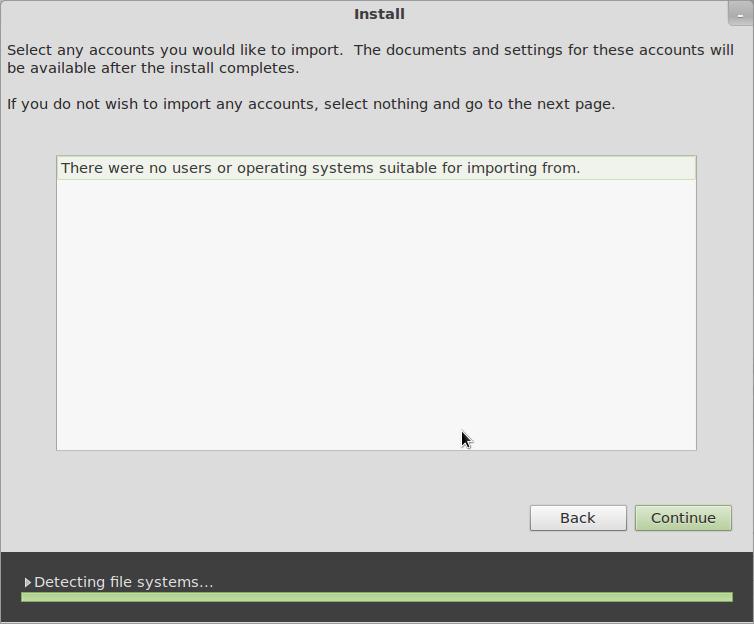
If there is anything else already on the disk that the Installer recognizes and might take over user account information from, it comes up in the next screen.
HP Pavilion dm1-4010ez
Once you have gotten this far, you will get some entertaining propaganda screens while the installation finishes. Hooray! When the installation finishes, reboot (and configure the Windows bootloader if you need to), and you'll be up and running Linux Mint 12.
That might seem like quite a long process, but each of those steps only takes a short time, and the entire installation can be done in 30 minutes if you are reading everything very carefully and thinking about the answers, or as little as 15 minutes or less once you are familiar with it and you're doing it on "autopilot".
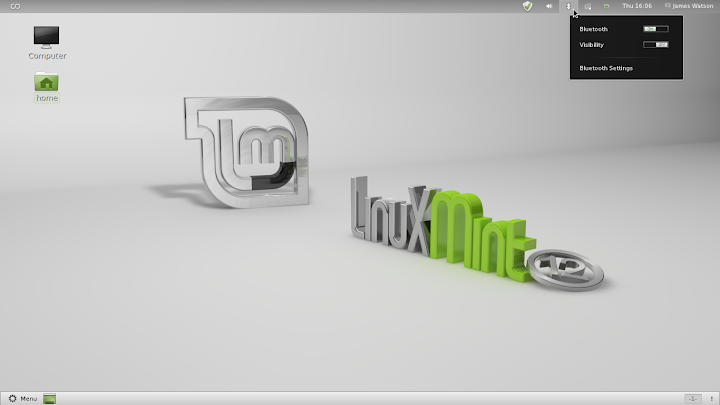
Now comes the good news - it works! As far as I can tell, with one small exception, everything works very nicely. Screen resolution is correct (1366x768), wired and wireless networking are ok (although the signal strength looks weak, as it did under Windows), the touchpad works just fine (SO much better for my nerves than the ClickPad), the Fn-keys for brightness, audio and WiFi control, Suspend/Resume (and it does each of those in less than 5 seconds), Mobile Broadband with my Huawei USB dongle... the only thing I have noticed which doesn't work is Bluetooth.

This is a bit of an inconvenience for me, because I sometimes use a bluetooth mouse or printer, but it is certainly not a big deal. By the way, in addition to showing the default Mint 12 desktop, I'll include the simplest way to tell if Bluetooth is working. It seems to me that the Bluetooth icon used to not show up in the panel if Bluetooth wasn't actually available, but now it looks like it is always there - perhaps this is something new with Gnome 3, I haven't really cared enough to look into it yet.

But if Bluetooth is actually available and working, when you click on the Bluetooth icon you will get options for "Send files to device..." and "Set up new device...". If you don't see those, as in the screen below, then Bluetooth is not available, so don't waste a lot of time tearing your hair out trying to figure out how to add a Bluetooth device, as I did, when Bluetooth isn't working at all.

I expect this problem to be taken care of by an update in the near future.
HP Pavilion dm1-4010ez
So, there you have it. I hope all of the detail was worthwhile - I'm certainly not going to be doing this on a regular basis, but I really wanted to show that installing Linux, whether it be openSuSE, Mint, or any of the other popular distributions, was not black magic, and really wasn't even all that difficult or dangerous.

What we have ended up with here is a very nice sub-notebook, it looks good, feels good, works well, and when we turn it on we can choose whether to run Linux Mint 12 (loud cheers in the background) or Windows 7 Home Premium (boos and hisses, and I am ducking lemons and rotten tomatoes being thrown from the cheap seats).
Next on the agenda: add the Cinnamon desktop, and compare it to Gnome and MGSE.

Tuesday, November 6, 2012

j5 Create's Clever Ultrabook KM Dock - PC Magazine

What looks like a flute and works like a Swiss Army knife? j5 Create's JUD500 Ultra Station 3.0 ($129.99), a USB 3.0 peripheral that serves as a plenty-of-ports desktop docking station for an ultrabook or other laptop and also lets that laptop control and transfer files to and from a desktop or other PC.

Plugging into a notebook's USB 3.0 port and an AC outlet, the silver cylinder provides one USB 2.0 port and two USB 3.0 ports, one with smartphone battery charging capability, along with 3.5mm speaker and microphone ports and a 10/100BaseT Ethernet jack. You can also connect a VGA or HDMI external monitor (though not both at once), with resolution up to 1,920 by 1,200.

CES 2012That's pretty standard docking-station fare, but the Ultra Station also features a mini USB port for connection to another computer—either Windows or Mac—using j5 Create's Wormhole technology as seen in the JUC100 Wormhole KM Switch.

The link lets you use one computer's keyboard and mouse or touchpad to control both, changing focus simply by moving the mouse cursor from the edge of one screen onto the other, and drag and drop files between the PCs. The clipboard works to cut, copy, and paste text between systems, too.

The Ultra Station 3.0 looks like a smart solution for someone who carries an ultrabook or other portable but returns to an office desk, particularly if that desk has a desktop PC on it.

Tuesday, August 21, 2012

Pinnacle signs agreement with DVS Soft to market its virtual desktopgateway ... - Computer Business Review

The secure remote access virtual desktop gateway application connects remote users to Windows desktops and applications, from anywhere in the world and from any device
Cloud based technology applications provider Pinnacle Technology Group has entered into an agreement with DVS Soft ("DVS") to market and distribute its secure remote access virtual desktop gateway application in the UK.
Pinnacle claimed secure remote access virtual desktop gateway application connects remote users to Windows desktops and applications, from anywhere in the world and from any device.
The virtual desktop gateway application delivers windows desktops and applications to the remote worker, providing better availability and agility of desktop services, the company added.
It also enables any Internet connected device running a Windows, Mac OS X, Linux or Chrome OS, to access user Windows desktops and applications from within the web browser.
The secure virtual desktop gateway gives users the flexibility and mobility to access their desktops from anywhere in the world and from any HTML5 enabled device, supports the latest bring-your-own-device (BYOD) initiatives and includes 128 bit and TLS (SSL) encryption.
DVS' gateway requires only HTML to install client side and RDP host. It doesn't need any open RDP ports as all traffic passes via the Gateway and includes security key support for added layer of security.

Pinnacle CEO Alan Bonner said: "This latest partnership gives Pinnacle exclusivity over a solution that is the market's first high performance HTML5 Remote Desktop Client, providing browser access to applications and desktops (virtual & physical), running on Windows Terminal Services, RDS/VDI platforms, including Microsoft Hyper-V and other hypervisors such as VM Virtual and Citrix machines."
Under the agreement, Pinnacle will also have the rights to distribute the DVS' product in the Broader European Region, including Ireland, Iceland, Greenland, Norway, Sweden, Finland, Denmark, Poland, Estonia, Latvia, Lithuania, Belarus, Moldova, Romania, Bulgaria, Greece, Albania, Macedonia, Serbia, Montenegro, Bosnia, Croatia, Slovenia, Hungary, Slovakia, Austria, Czech Republic, Germany, Switzerland, Italy, Cyprus, Netherlands, Belgium, France, Spain, Portugal and Russia.

Google launches Octane Javascript benchmark for desktop, smartphones and ... - MobileSyrup.com


MobileSyrup.com

Google launches Octane Javascript benchmark for desktop, smartphones and ...
MobileSyrup.com
Google has launched a new Javascript benchmark for desktop, smartphone and tablet browsers, focusing on its new V8 Javascript Engine. Octane expands the company's existing V8 Benchmark Suite, adding five new tests that are relevant to the real-time ...
Octane: a new JavaScript browser benchmark by GoogleTweakTown

all 14 news articles »

Sound in remote desktop does not work after a disconnect/reconnect - GameDev.net


Sound in remote desktop does not work after a disconnect/reconnect
GameDev.net
Until now that is... through a rather random incident during testing, it turns out that when a remote desktop session is disconnected, after reconnecting sound won't work. I did some digging around and my guess is that the Windows playback device ...

Pin quick reminders to your Mac desktop with the clever Sticky Notifications - The Next Web


The Next Web

Pin quick reminders to your Mac desktop with the clever Sticky Notifications
The Next Web
I've always been a fan of Stickies, the note application that comes with OS X, but the Dashboard is too far out of mind and notes floating around on my desktop behind windows just isn't practical. That's why I love Sticky Notifications, an app from ...

The desktop is dead! Again! - Consumer Tech


Consumer Tech

The desktop is dead! Again!
Consumer Tech
The surveyed CIOs were from companies with 1000 or more employees, across multiple sectors, and almost three quarters said that desktop purchasing will eventually be a thing of the past, paving the way for bring your own device (BYOD) policies. However ...

and more »

Blue Marble to Exhibit at ISPRS 2012 Conference in Melbourne, Australia - Amerisurv


Blue Marble to Exhibit at ISPRS 2012 Conference in Melbourne, Australia
Amerisurv
Come and visit Booth 27B to see first-hand the latest enhancements found in Blue Marble Desktop v2.5 and Global Mapper v13.2. Blue Marble's geospatial data manipulation and conversion solutions are used worldwide by thousands of GIS analysts at ...

and more »

Forget the Desktop - Slate Magazine


Slate Magazine

Forget the Desktop
Slate Magazine
Designers should create sites that don't just accommodate tablets but prioritize them. In fact, they ought to think of tablets first when they're creating new sites. Only after building pages for 7- and 9-inch touchscreens should they tweak their sites ...

and more »

CyberpowerPC Announces Pro Gamer FTW Desktop PC Series Integrated For ... - Broadcast Newsroom


Custom PC Review

CyberpowerPC Announces Pro Gamer FTW Desktop PC Series Integrated For ...
Broadcast Newsroom
DMN Newswire--2012-8-21--CyberPower Inc. www.cyberpowerpc.com, a global manufacturer of custom gaming machines, today announced the Pro Gamer FTW -- a new series of desktop gaming systems tailored for the seamless integration of gaming and ...
CyberpowerPC Announces Pro Gamer FTW Desktop PC SeriesCustom PC Review
CyberpowerPC announces Pro Gamer FTW desktop PC series, powered by ...TweakTown

all 8 news articles »

Dell Unveils VMware-Validated Desktop Virtualization Offerings - Sci-Tech Today


Sci-Tech Today

Dell Unveils VMware-Validated Desktop Virtualization Offerings
Sci-Tech Today
"Desktop virtualization models are gaining ground as today's IT departments are looking to streamline IT management and more easily address data security and BYOD policies," said analyst Matt Eastwood. "Dell has a unique advantage to provide a ...
Dell forms Desktop Virtualization Solutions for GovernmentZDNet
Dell Wyse Unveils New Products for VDI, Enterprise BYODeWeek
Dell Expands Virtualization, Storage, Management Tool LineupInformationWeek
CTR -GCN.com -defpro
all 37 news articles »

Dell quarterly revenues down 8% on poor desktop performance - Register


BBC News

Dell quarterly revenues down 8% on poor desktop performance
Register
Wall Street analysts were expecting a drop off in Dell's business and they won't be disappointed, with the company reporting revenues down 8 per cent for the second quarter of the year. Dell blamed the drop on poor performance in its PC and mobile ...
Dell revenue forecast misses estimates as PCs continue slumpAsbury Park Press
Dell Forecast Misses Estimates as PC Sales SlumpBusinessweek
Death To The PC? Dell Dives 18%SmartHouse
CNET -V3.co.uk -Investor's Business Daily
all 147 news articles »

RENT-A-CENTER INC : Get It Now! Makes Product Donation to Running Rebels - 4-traders


RENT-A-CENTER INC : Get It Now! Makes Product Donation to Running Rebels
4-traders
Get It Now! today donated $5000 worth of electronics, including two televisions, five desktop computers and two laptop computers to Running Rebels Community Organization. "The donation came in at the perfect time and is right on the money," said Eric ...

and more »

United States : HP Helps Companies Speed Deployment of Virtual Desktop ... - Equities.com


United States : HP Helps Companies Speed Deployment of Virtual Desktop ...
Equities.com
HP today broadened its desktop-to-data-center virtualization portfolio for VMware View environments with new offerings to help enterprises speed the deployment of virtual desktop technologies. HP will be showing the new virtualization solutions at ...
HP adds new Zero Client optimized for VMware VieweChannelLine
Teradici Expands VDI Product Portfolio to Include PCoIP Optimized™ Software ...Virtual-Strategy Magazine

all 18 news articles »

VMware, Vidyo, Mitel Partner on Virtualized UC, Video Solution - eWeek


Telepresence Options

VMware, Vidyo, Mitel Partner on Virtualized UC, Video Solution
eWeek
Mitel and Vidyo are teaming up to bring enterprise-level video conferencing capabilities to VMware's View desktop virtualization offering. The companies announced Aug. 21 that Mitel, already a VMware partner, will integrate Vidyo's VidyoConferencing ...
Mitel, Vidyo, VMware unveil UC-enabled Telepresence with VMware VieweChannelLine
Mitel, Vidyo, VMware Tackle Video Collaboration Over VDIChannel Partners
VMware View 5.1: Relieving Potential Pain from VDI ProjectsServer Watch
4-traders -Telecompaper (subscription)
all 22 news articles »

Is GNOME Still Needed? - Datamation


Is GNOME Still Needed?
Datamation
At the time, there was no other free desktop, since KDE relied on the then-proprietary Qt toolkit. But today, looking at the mounting evidence of problems within the project and the denial of many project members, I have to ask: Does free software ...

New Zealand's South Taranaki District Council Provisions Custom Virtual ... - Virtual-Strategy Magazine


Sci-Tech Today

New Zealand's South Taranaki District Council Provisions Custom Virtual ...
Virtual-Strategy Magazine
New Zealand local government South Taranaki District Council is proving that Virtual Desktop Infrastructure(VDI) projects can be simple, fast and cost-effective with the deployment of a new council-wide initiative that relies on Unidesk® desktop ...
Citrix VDI-in-a-Box Upgrade Allows More PersonalizationSci-Tech Today
CITRIX SYSTEMS, INC. : New Citrix VDI-in-a-Box Release Makes Simple ...4-traders
Citrix upgrades its VDI-in-a-BoxeChannelLine
Ervik.as
all 20 news articles »

Help Desk/Desktop Suppt - Geekzone


Help Desk/Desktop Suppt
Geekzone
IT & Technology : Other (Contract / Temporary) We are seeking an experienced Help Desk/Desktop Support Analyst for a 3 mth CONTRACT You will have experience of Help Desk and Level 2 desktop support activities ideally within a banking environment.

Five Desktop Virtualization Myths Debunked - GovExec.com


Five Desktop Virtualization Myths Debunked
GovExec.com
A lot has been published in the past few years on desktop virtualization. Despite this, many virtualization rumors and myths still persist. Download this report to learn why these five myths are not true! Debunked in this report: Myth: The benefits of ...